
Smarter Catalogue Uploads: Spotting Invalid Columns Instantly
Managing bulk catalogues can be messy, especially when files don’t follow the required format. Earlier, our system had a gap: if anyone added a non-defined column in their import file, the upload still went through. This led to confusion, mismatches, and extra debugging time later.
We’ve now solved this with a much cleaner and transparent approach.
What Changed?
Previous Flow
If a user uploaded a file with additional or incorrect column names, the system would still accept it. Errors only appeared much later when catalogue mismatches surfaced, making troubleshooting a headache.
New Flow
Now, whenever a user adds any non-defined attribute in their column header, the system will immediately flag it. Instead of silently accepting the file, it shows an error message:
“Your sheet contains errors. Refer to the attached error log for detailed information.”
A Download button is provided alongside the message. Once clicked, the system saves an error report locally on the user’s device.
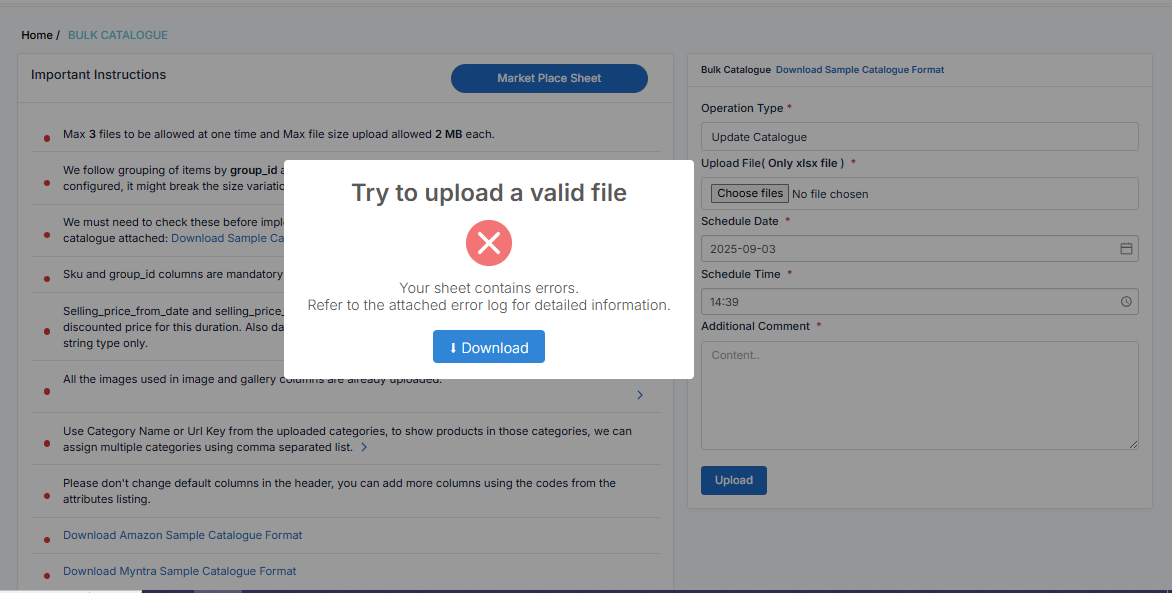
Error Report: A Clear Diagnosis
The downloaded sheet contains detailed logs highlighting:
- Which column(s) don’t match the defined attributes
- What caused the mismatch
- A direct pointer to where the user needs to fix things
Example:
If a column brand_theone was added but didn’t exist in the defined attributes, the error log will explicitly say:
“brand_theone didn’t match in attribute or product column.”

This ensures users know exactly what went wrong without wasting time searching.